
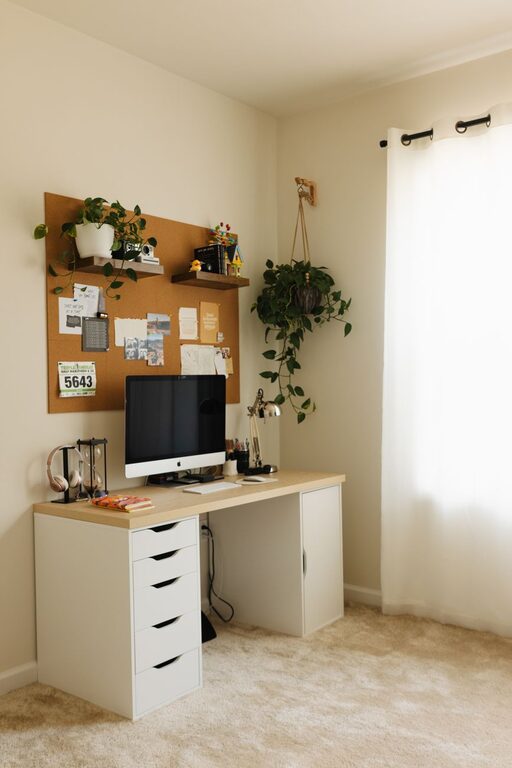
Creating a home office that is both cozy and functional can significantly enhance your work experience, especially as more people embrace remote and hybrid work. A well-designed space not only improves productivity but also promotes comfort and well-being. In this guide, we’ll cover practical tips and ideas to help you create a home office that you’ll enjoy spending time in.
1. Choose the Right Location
Consider natural light
Select a spot near a window if possible. Natural light helps reduce eye strain and boosts mood. Position your desk to take advantage of daylight without causing glare on your computer screen.
Minimize distractions
Pick a quiet corner or room where noise and foot traffic are minimal. This separation helps you focus and mentally switch into work mode.
2. Invest in Comfortable and Supportive Furniture
Ergonomic chair
An adjustable, ergonomically designed chair supports your posture and reduces the risk of back pain. Look for chairs that offer lumbar support, adjustable seat height, and comfortable cushioning.
Functional desk
Choose a desk that fits your space and work style. A surface that’s wide enough for your computer, notepad, and other essentials helps avoid clutter. Consider a sit-stand desk to alternate between sitting and standing, which can improve circulation.
Storage solutions
Incorporate shelves, filing cabinets, or storage bins to keep documents and supplies organized. When everything has its place, your desk stays tidy and inviting.
3. Optimize Lighting for Comfort and Productivity
Layer your lighting
Combine natural light with task lighting. A desk lamp with adjustable brightness lets you control light levels during different times of day.
Use warm, soft bulbs
Cool lighting can feel harsh in a cozy space. Choose bulbs that emit warm or soft white light to create a relaxing atmosphere without sacrificing clarity.
4. Personalize Your Space
Add plants
Indoor plants improve air quality and bring a calming element to your office. Choose low-maintenance plants like pothos or succulents if you don’t have a green thumb.
Incorporate meaningful decor
Display photos, art, or inspirational quotes that motivate you. Personal touches make your space feel welcoming and uniquely yours.
Textiles for warmth
Include a soft rug, cozy throw, or cushions to add texture and warmth to the room. These details make the space feel more comfortable and inviting.
5. Keep Technology and Cords Organized
Cable management
Use cable clips, sleeves, or under-desk trays to keep cords organized and out of sight. This not only looks neater but also prevents accidents or damage.
Efficient tech setup
Arrange your monitor, keyboard, mouse, and other accessories ergonomically to reduce strain. Consider wireless devices to minimize clutter.
6. Maintain a Clutter-Free Environment
Daily tidy-up routine
Take a few minutes at the end of each day to clear your desk and organize papers. A clean workspace helps reduce stress and prepares you for the next day.
Use organizers
Desk trays, pen holders, and drawer dividers help keep supplies accessible yet orderly. Label storage containers for even easier access.
7. Control Noise Levels
Soundproofing options
If noise is an issue, consider adding rugs, curtains, or wall panels that absorb sound. White noise machines or soft background music can also help mask distractions.
Headphones
Noise-canceling headphones are a great investment if quiet is hard to achieve at home.
8. Mind Your Air Quality and Temperature
Ventilation
Good airflow is essential for comfort and focus. Open a window when you can or use a fan or air purifier to keep air fresh.
Temperature control
Keep a blanket nearby if your workspace gets chilly or a small fan for warmer days. Maintaining a comfortable temperature helps you stay productive.
9. Plan Your Layout for Efficiency
Zone your space
Designate areas for specific tasks such as computer work, meetings, or brainstorming. This can help you mentally switch tasks and stay organized.
Easy access to essentials
Place frequently used items within arm’s reach to reduce interruptions and improve flow.
10. Create Boundaries for Work-Life Balance
Visual separation
If your workspace is part of a larger room, use room dividers, curtains, or furniture placement to visually separate your office area from the rest of your home.
Set work hours
Establish clear working hours and take breaks away from your desk to refresh.
—
By combining comfort with practicality, your home office can become a favorite spot to work and create. Small adjustments and thoughtful design go a long way in making the space inviting and efficient. Start with these tips to build a workspace that supports your best work every day.
About the Author


